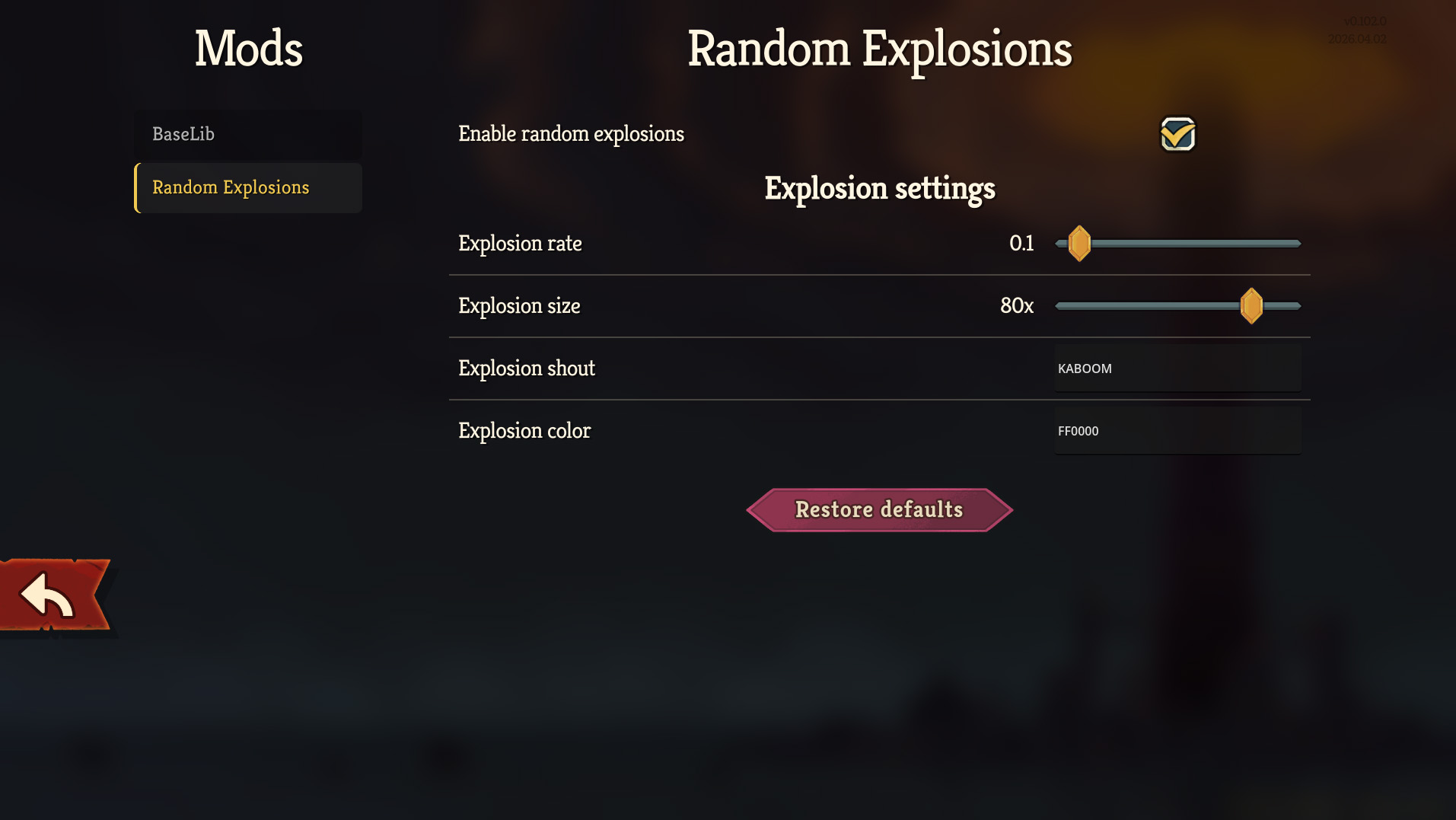
Mods that want customizable config options can register a config with BaseLib.
Setup
First, the config options must be defined. Create a class inheriting from SimpleModConfig.
internal class MyModConfig : SimpleModConfig {

}
Inside this class, define a static property for each config value you need. The value assigned to it will be its default value.
internal class MyModConfig : SimpleModConfig {
    public static bool RandomExplosions { get; set; } = true;
    public static int ExplosionSize { get; set; } = 80;
}
Lastly, register your configuration. This is best done in your mod’s initializer, preferably at the start of it so that config values are loaded and set before the rest of your code runs.
public static void Initialize() {
    ModConfigRegistry.Register(ModId, new MyModConfig());
    ...
}
This is all you need to do in order to have BaseLib load and save your configuration data automatically, as well as create a configuration UI.
Since the properties are static, you can access them from anywhere in your mod’s code as e.g. MyModConfig.ExplosionSize.
After doing this, you should be able to find your mod’s config screen in the Mod Configuration menu (in the main menu by default, and under Settings).
Localization
The names of properties displayed on the configuration screen can be changed by adding an entry to settings_ui.json in your mod’s localization. For each property, its localization key will be MODNAME-PROPERTY_NAME.title. The title of the configuration screen can be set with MODNAME.mod_title. If this example mod config was in the mod RandomExplosions this is what its localization might look like:
{
  "RANDOMEXPLOSIONS.mod_title": "Random Explosions",
  "RANDOMEXPLOSIONS-RANDOM_EXPLOSIONS.title": "Enable Random Explosions",
  "RANDOMEXPLOSIONS-EXPLOSION_SIZE.title": "Explosion Size"
}
The same conversion is performed for things like section names such as [ConfigSection("SectionName")], button labels, and so on.
See the Setup page for the mod template for information about localization and how to get the above into the game.
Automatic UI
The following types are currently supported:
| Type | Generates |
|---|---|
| bool | Checkbox |
| Any enum | Dropdown |
| int, float, double | Slider |
| string | LineEdit |
| Color, or [ConfigColorPicker] string | Color picker button |
| Method | Button (see Advanced) |
Static properties of other types need to be marked with [ConfigIgnore] to avoid a message printed in the console/log.
Checkbox, Dropdown
These have no special configuration.
public static bool SkipNeow { get; set; } = false;

public enum PotionDropRate { Low, Normal, High, Guaranteed }
public static PotionDropRate EnemyPotionDropRate { get; set; } = PotionDropRate.Normal;
Slider
Supports a user-defined range and step (in order: min, max, step), as well as an optional format for the label.
int, float and double are supported as backing types. Has a SetRange method for setting a range dynamically, when the allowed range isn’t known at compile time (see Advanced).
// See https://learn.microsoft.com/en-us/dotnet/standard/base-types/custom-numeric-format-strings
// for formatting details
[ConfigSlider(-20, 20, 1, Format = "{0} HP")]
public static int StartHPOffset { get; set; } = 0;
LineEdit
Supports a user-defined max length, as well as allowed characters (via a preset or custom regex).
If the user enters an invalid value and the LineEdit loses focus, it reverts to the most recent valid value.
[ConfigTextInput(TextInputPreset.SafeDisplayName, MaxLength = 16)]
public static string PlayerName { get; set; } = "Player";

[ConfigTextInput(@"[A-Z0-9]+")] // Seeds can technically contain any character, but for the sake of example
public static string ForcedRunSeed { get; set; } = "123456789ABC";
Color picker button
Shows a colored square that opens a color picker when clicked. Can be backed by either a Godot.Color or a string.
If string is used, the [ConfigColorPicker] attribute is required (a LineEdit will be generated for a string without the attribute).
// Attribute optional if the default values are used; these are not the defaults
[ConfigColorPicker(EditAlpha = false, EditIntensity = true)]
public static Color PlayerColor { get; set; } = Color.FromHtml("#30ff50");

// Attribute required for string even with default values
[ConfigColorPicker]
public static string ExplosionColor { get; set; } = "#ff3000ff";
Other attributes
Aside from the control-specific attributes showcased above, a few others can be added to your SimpleModConfig for additional customization.
Also see Advanced for more information about e.g. conditional visibility.
// Enables hover tips for all properties unless the individual property has them disabled
// by marking them with [ConfigHoverTip(false)]. You still need to add localization strings.
[ConfigHoverTipsByDefault]
internal class MyModConfig : SimpleModConfig {
    // Adds a hover tip for just this property, uses .hover.desc and .hover.title (optional) suffixes
    // in localization. Not necessary with [ConfigHoverTipsByDefault] on the class.
    [ConfigHoverTip]
    public static bool RandomExplosions { get; set; } = true;

    // Starts a new collapsible section with the next property/method. Can be localized the same way as
    // properties. For the example mod, this property's text would be defined as:
    // RANDOMEXPLOSIONS-EXPLOSION_SETTINGS.title
    // Set CollapsedByDefault to true if the section should initially be collapsed when the config page opens.
    [ConfigSection("ExplosionSettings")]
    // Use [ConfigSection("ExplosionSettings", CollapsedByDefault = true)]
    // to have the section start collapsed when the config page is opened.

    // Only shown if RandomExplosions is enabled above
    [ConfigVisibleIf(nameof(RandomExplosions))]
    public static int ExplosionSize { get; set; } = 80;

    // Will keep its value despite Restore Defaults being used (by the user, or via
    // ModConfig.RestoreDefaultsNoConfirm).
    // You can use ModConfig.GetDefaultValue to reset it manually (or, of course, simply set the
    // property value manually).
    // Useful with [ConfigHideInUI] for persistent state, but can be used with visible options as well.
    [ConfigIgnoreRestoreDefaults]
    public static bool PersistentSetting { get; set; } = true;

    // Will be loaded and saved, but not shown in the UI.
    // If you change the value at runtime, call ModConfig.SaveDebounced<MyModConfig>() to ensure that
    // the new value is written to disk.
    [ConfigHideInUI]
    public static int TotalExplosionCount { get; set; } = 0;

    // Won't be loaded, saved or shown in the UI
    [ConfigIgnore]
    public static int UnrelatedStaticProperty { get; set; } = 0;
}
With all localization strings added, the examples above look like this (with some removed for the UI to fit on screen):